
So this is just a quick post to go over a really handy trick to overcome some layer short comings in the Next. As you’re probably aware, the Next has 3 main playfields, and these can be ordered using register 0x15.

Here you can see the various orders of “S L U” or “L S U” and so on. This stands for Sprites, Layer2 and ULA, and you can shuffle the order so you can put sprites in front of layer 2, but behind the ULA screen and so forth. However, Tilemaps are a problem, as they “stick” to the ULA layer. So when you move the ULA screen layer, you also move the tilemaps, and this in turn means you can’t put sprites in front of tiles, but behind the ULA screen. Which is a shame, as the ULA screen is very handy for scores/debug etc.
But…. there is a way. In the layers you’ll also notice 2 blend modes. They show the odd (U|T)S(T|U) ordering. This suggests the Tiles and ULA screen can be selectively moved, but how? Normally, you’d pick this layer in order to do shadows, or torches etc, but there are actually a few different blend modes you can pick via register 0x68.

You’ll notice one of the blend modes is “no blending“, and this is the mode we’re interested in. If we set the layer mode to %110 (the first blending mode), and then select %01 for no blending, then everything should look about the same, though tiles will be in front of the sprites – like this.

Here you can see the tiles and ULA screens are in front of the sprite (you can see it peeking through the ladder). But, in the tile attribute, the second byte of the Tilemap (or register 0x6C), the first bit is a ULA priority bit, allowing you to push the ULA screen over “that” specific tile.

Now if you remember the layer 6 settings, it said the ULA or tiles could be on either side of the sprites, and it turns out, when you set the ULA to have priority, it pushes the tilemap BEHIND the sprites!

Now, you can do this on a tile by tile basis, which does mean you could walk behind some tiles if you like, but if you set the lower bit on EVERY tile, then you push the whole tilemap behind the ULA screen, and the sprites.
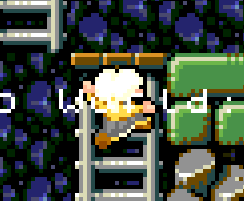
Here you can see I’ve done just that, and now the player is above the tiles, but the “Hello World” text on the ULA screen, is above the sprites, putting the sprites in the middle.
This means you can use the ULA screen for scores, messages – whatever. You can also kick it into Timex mode, and do high colour, or even Lowres for a chunky 256 colour overlay.
Hope this was of use, it’s a hidden gem of the Next hardware